
Check Stud.IP plugins
Check Stud.IP plugins
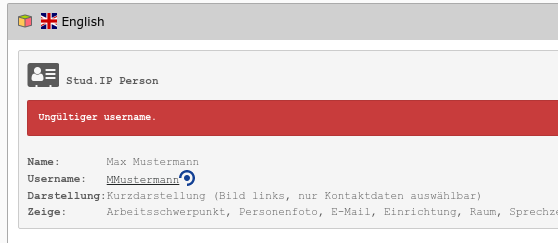
More information about the Stud.IP plugins is now also displayed in the page module (see bottom of this page). An overview - also of plugins on the subpages - can be found using the procedure described here.
Working with Stud.IP-based contact data is very convenient in TYPO3 because the current contact data is automatically used without having to be updated manually in TYPO3.
Nevertheless, there may be problems with the embedded contact data if the following two conditions are not met:
- The person whose contact details are to be displayed must have authorised them in Stud.IP for external use. Only then is it permitted under data protection law to make the contact details visible externally. If the person has not authorised their contact details in Stud.IP, the embedding cannot work. It is therefore important to check whether all embedded contact data has actually been released.
- The person whose contact details are to be displayed must currently be employed at the university. If the person has left in the meantime, contact details can no longer be displayed. It is therefore important to find the places within the TYPO3 web pages where reference is made to people who have left the university.
Procedure for checking
- Call up the module Web → Stud.IP in the function column.
- Click on the top page in the page tree
- Select Depth = 10.
- Click on the [Reload] button - this will check your pages for the above conditions.
- Contact data that has not been released will be highlighted in yellow (non-public person), persons who have left will be highlighted in red ("Invalid username").
Please click on these thumbnails for orientation:


Remedy for problems found
- A (non-public) person who has not yet released their contact details in Stud.IP for external display can be informed of this with a mouse click and asked to release them. Clicking on the email address should open the email programme.
- If a person has been removed, the relevant content element can be deactivated or deleted in TYPO3. Clicking on the "Page layout" symbol next to the page title displayed takes you to the page layout where you can edit the elements. This corresponds to the view displayed in the "Page module" for the page. Alternatively, you can also filter in the page tree.