
Electronic registration certificate for social insurance
Electronic registration certificate for social insurance
Electronic registration certificate for social insurance
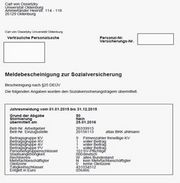
All employees who are subject to social security contributions receive a social security registration certificate from their employer once a year, the so-called annual registration (see Figure 1).
In addition, further social security registration certificates are sent to employees as required, e.g. when starting or ending employment, when changing health insurance fund, etc.
These registration certificates were previously sent in paper form.
From now on, the paper form will be replaced by the electronic provision of these certificates.
As with the provision of electronic payslips or electronic wage tax statements, every employee for whom a social security registration certificate has been issued will receive a personally addressed email informing them of this:
- The email contains a link that takes the employee directly to the portal. In the portal, the employee logs in to their personal account by entering their user name (in the form abcd1234 ) and their personal password.
- For security reasons, the employee's personal password must be entered again after opening the screen.
- After logging in, the employee is shown the social insurance registration certificates provided for him/her under the "Social insurance" button (see Figure 2).
- Click on a registration certificate for social insurance to open it.
- In addition to opening it, the employee can also save, print or delete the social security registration certificate in another location.

If the system cannot detect any user activity for five minutes, the user's session is automatically terminated by the system.
It can then only be restarted by re-entering the user name.
Note:
In addition to the link in the email personally addressed to the employee, employees can also access the portal via a corresponding button on the Division 2 website (dezernat 2/personalabrechnung/service) and via Stud.IP (profile - tab "Personalabrechnung"), where they can log in as described above.
If employees leave the employment relationship, they will continue to have access to their data. Only when the former employees request the deletion of their user account with IT services will the stored proofs also be deleted. If a person leaves the University of Oldenburg as an employee and does not use their IT account for a period of 180 days, the account and all their documents will be deleted.