
IT Support for School I

IT Support for School I

A warm welcome to School I’s IT Support team,
we are the first point of contact for technical enquiries from School I and its staff. Our responsibilities include the following:
- Providing technical support to researchers and staff on IT-related issues and the use of digital systems and applications
- Procurement and management of IT hardware, software and multimedia technology, including inventory management and installation
- Design and implementation of multimedia solutions for teaching, research and event formats
- Operation and technical administration of video observation laboratories to support research projects
- Technical management and maintenance of servers in the Data Centre
- Management of mobile devices (Apple and Android systems) using Mobile Device Management (MDM)
- Provision and organisation of mobile conference and media technology for teaching sessions, conferences and other events
- Technical support for the School’s scientific and academic events
- Management and technical provision of the faculty’s own premises to ensure smooth operation
Handling and resolving other technical enquiries within the faculty
The Institute of Social Sciences is not managed by us, but by Regina Jussen.

How can I contact the IT support of School I?
You can reach us via the following channels:
- by telephone (see contact details on the left)
- by email (to
- via website (open servicedesk.uni-oldenburg.de in the browser → Self-Service-Portal → IT Support of the FKI)
- or of course personally on site in A02-1-102
How do I place an IT order?
There are two ways to place an order:
- by email to
- via our web interface → servicedesk.uni-oldenburg.de → Self-Service-Portal → IT Support of the FKI → IT Order to School I
If you have any questions, we will get back to you.
Attention: Please do not order technology independently via the EDE portal, but choose one of the above-mentioned channels!
Which technical devices are lent out by IT support?
We lend out the following equipment:
- Photo and video cameras
- webcams
- MeetingOwl 3
- Powerbanks (20,000 mAh)
- projector
- HDMI cable
- Catchbox microphone system
- Further articles on request
What are the IT support opening hours?
We are usually available Monday to Friday from approximately 9.00 am to 4.00 pm.
Appointments outside of these hours are available on request (!)
How do I install software? (Windows devices)
You can open the ‘Software Kiosk’ on your desktop.
There you will find a list of various programmes which you can assign to your device by clicking on ‘Assign ’.
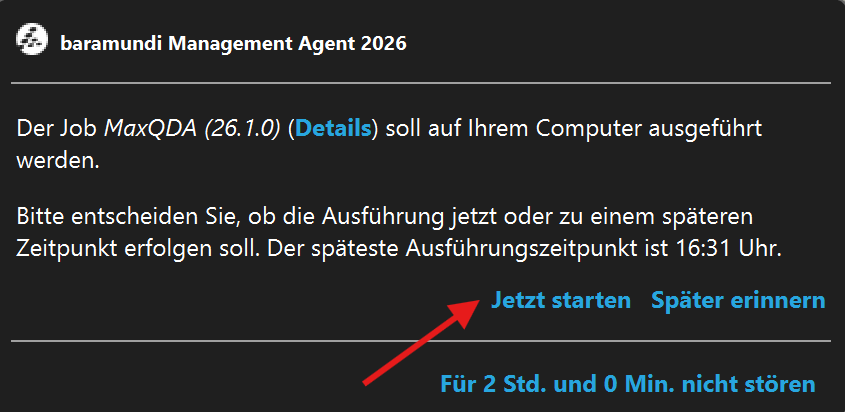
Shortly afterwards, a window named ‘Baramundi Management Agent’ will open in the bottom right-hand corner; you’ll need to click ‘Start now’ to install the programme.
If the programme you require is not available, please email us at so that we can install it manually (this can also be done via remote support!).
On Apple devices, you can install software yourself, so there is no separate menu option for this.
Links to key information from IT services:
| Groupware (email, calendar, etc.) → | https://uol.de/itdienste/services/groupware |
| Access to the campus network (Wi-Fi/VPN) → | https://uol.de/itdienste/services/zugang-zum-campusnetz |
| Video and web conferencing systems (BigBlueButton, Cisco, etc.) → | https://uol.de/itdienste/services/video-und-webkonferenz |
| Mailing lists (via StudIP) → | https://uol.de/itdienste/services/mailing-listen |
| Printers and printing services (FollowMe) → | https://uol.de/itdienste/services/kopieren-drucken-scannen |
| Data storage (network drives, cloud, etc.) → | https://uol.de/itdienste/services/datenhaltung |
| Using StudIP (guides, etc.) → | https://uol.de/itdienste/services/lernmanagementsystem-studip |
| Information on user accounts (functional accounts, 2FA, etc.) → | https://uol.de/itdienste/services/nutzerkonto |
| General information on 2FA (two-factor authentication) → | https://uol.de/2fa |
| Scheduler (Doodle alternative) from the German Research Network → | https://uol.de/itdienste/services/terminplaner |