
Instructions for using nkoda
Instructions for using nkoda
Nkoda is a database for the use of digital grades. The database offers access to 30 million pages of sheet music from several centuries and from over 100 music publishers. Access is via an app. Not only can grades be downloaded to different devices, they can also be annotated there.
Use of the database requires access via the university's campus network or installation and use of the VPN client.
You can access nkoda directly via the following link: app.nkoda.com/log-in.
However, you can also access this page by searching in ORBISplus or the database information system (DBIS).
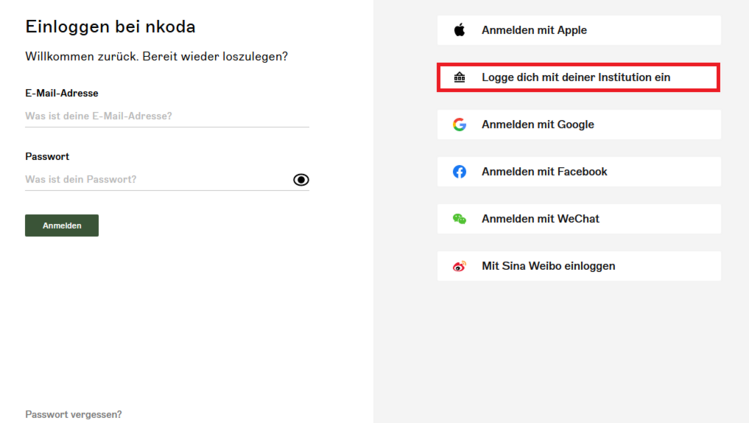
On the nkoda homepage, select "Log in with your institution":
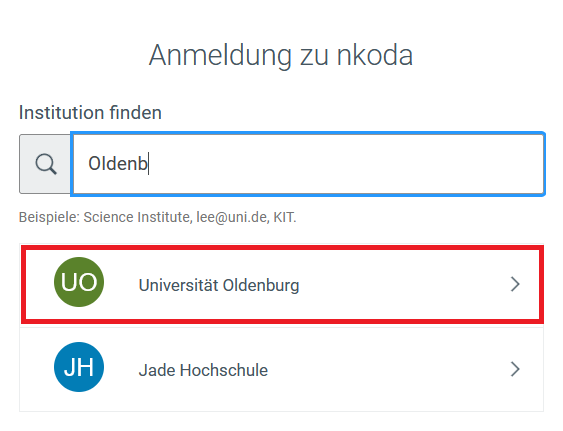
On the following page, enter "Oldenburg". In most cases, nkoda will find the University of Oldenburg after just a few letters:
If you have selected the University of Oldenburg, you will be asked to log in with your university account:

You can then create a personal user account with nkoda. Please note that this is only possible with the university email address (vorname.nachname@uni-oldenburg.de).
After logging in, the database can be used online.
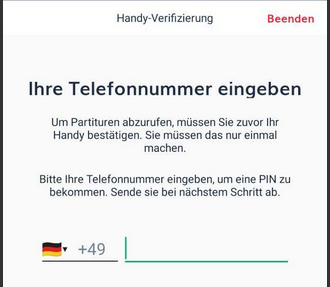
Note: To download grades, use them offline or edit them, for example, you will need to install a separate app (various versions for Windows, iOS, Android). Use of the app also requires authentication:
If you have any questions, please contact the Music Department.