

Variants of working with multilingual websites
Variants of working with multilingual websites
Tight or loose translation of the website
TYPO3 distinguishes between two types of multilingualism:
- The English language version should be a close translation, in which the content elements of the English page version correspond 1:1 to the German page version and should also remain permanently in this close context.
- The English language version should only be a loose copy of the German language version, but in which there can be different content elements; ultimately, each language version can be edited independently of the other - almost as if they were different pages.
The close translation (1.) is therefore intentionally much stricter than the loose copy and has this effect:
- In the English language version, content elements cannot be moved and no new content elements can be created.
- New content elements can only be created as a copy of an existing content element in the German language version.
Generate one of the two translation variants
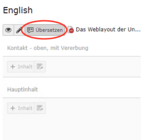
When creating an English language version of the existing German-language website, a [Translate] button (Fig. 1) is offered for each content column. This button is used to copy the German-language content into the English version of the page so that it can then be translated. In this way, the internal structure of the page can be quickly transferred to the translation.
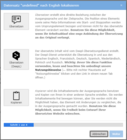
When you click on [Translate], a dialogue window appears (Fig. 2) in which you can select from three options:
- "Translate" creates a close copy of the German page, whereby the German content is copied into the English version of the page and must then be translated by hand.
- "Translate (DeepL)" creates a close copy of the German page, whereby the German content is automatically translated into English.(Important: Subsequent proofreading required!)
- "Copy" creates a loose copy of the German page, whereby the German content is copied into the English version of the page. The English language version can then be freely edited, e.g. elements can be added or deleted at a later date.
Can this compelling connection between the pages be resolved retrospectively?


Yes, with a little manual effort, the strict binding of the content elements to their German versions can be cancelled - here are a few explanations and the necessary procedure:
- Each content element of the English language version contains a "Source text" field in which the corresponding element of the German page version can be selected (Fig. 1). This defines the relationship between these two elements in German and English.
- As soon as at least one content element within the English language version has such a link to a German-language content element, TYPO3 assumes that a close translation is being aimed for.
This means that all content elements on the page must consequently have such a link to their respective German counterpart, as otherwise - in relation to the entire page - it would not be a close translation after all. If this link is not found everywhere, an orange warning appears (Fig. 2) that the content is "inconsistent".
content elements without this link are then displayed in red (Fig. 3). - If the strict translation link is to be broken, you can edit the previously linked elements(not shown in red) and empty the "Original text" field (Fig. 1) at the top (top entry of the selection list offered) and then save the respective element.
Initially, more and more elements will appear in red, but after the last element has been removed from its German language version, TYPO3 no longer considers the translation to be a close translation, and page content can immediately be created, moved and deleted in the English page version in the usual way.