

TYPO3 13
TYPO3 13
Even after the update to version 13, our TYPO3 CMS can still be operated in the familiar way and, in addition to security-related improvements, also brings some advantages when editing content. At first glance, however, the colour scheme changes - but this can be adapted to your own taste.
The colour scheme of the TYPO3 backend
There has been a dark mode for UOL websites for years, which can be activated either manually or automatically depending on the operating system. This now also applies to the TYPO3 backend.
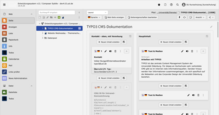
- By default, all columns in the edit view are now light-coloured (Fig. 1).
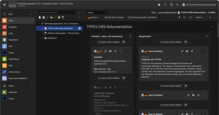
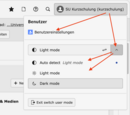
- Manual or automatic dark mode (Fig. 2) can be activated via the user menu (click on your own name at the top right of the TYPO3 window - see Fig. 4).
- The classic view (with dark header and page column, Fig. 3) can also be reactivated via the user menu and the link there to the user settings - see Fig. 4 and 5 for the procedure.
The three display modes and how to activate them:


Improvements in TYPO3 v13
TYPO3 version 13 brings noticeable improvements, for example:
- Appearance modernisation: In addition to the aforementioned light and dark mode, many control elements have been visually modernised. Some of them appear clearer and larger, which improves usability. This goes hand in hand with other measures to improve accessibility.
- Increased speed
- Improved internal search options
- Moving content elements between pages using drag & drop
- Improved simultaneous and therefore faster editing of multiple content elements
- SVG graphics (vector graphics) can now also be cropped (e.g. in text & media elements)
Further details will be discussed in training courses and documentation websites.