

Day 06
Day 06
Day 6: Statistics
ATTENTION: Outdated version from 04.10.2014. PLEASE use pdf version of the script.
Command reference: Matlab syntax
pdf version of the script: [Tag06.pdf]
Word version of the script: [Tag06.docx]
Downloads:
T6A4 and *T6B6): [sbkerne.mat]
T6A11), T6C1) [Maeusepellets.mat]
T6B1) [rt_VP5.mat]
*T6B4) [rt_all.mat]
T6H1, T6H2): [vogelfang.m]
*T5H4) [answer1khz.mat] [stimulus1khz.mat]
Topics:
A) RANDOM NUMBERS AND PROBABILITY DISTRIBUTIONS
Background:
Experimental measurements are used in an attempt to make generalised statements and establish rules for investigated relationships. A parameter (e.g. amount of fertiliser) is varied and the resulting effect on a measured variable is observed. This would be very simple if every observation always turned out the same when repeated several times. In reality, however, this is not the case: measurement data always depends on chance, at least to a certain extent, because it is never possible to exclude all random factors in an experiment. (For example, in a study on the effectiveness of a drug, how much the patients smoked or whether they were under stress could have an influence). Even if there is a clear dependency between the varied parameter and the measured variable, the measured values will differ and scatter around the expected value.
Probability distribution:
If an experiment is repeated in exactly the same way very frequently, a frequency distribution is obtained. This indicates how often a certain measured value was observed and is used to estimate the probability of this measured value.
Frequency distributions are determined empirically for measurement data (including random numbers generated artificially by a computer) in order to draw conclusions about the underlying probability function. Histograms are used for this purpose. These divide the entire range of values of the variable into several areas. For each of the ranges, the histogram indicates how often the value of the variable was within the respective range in a measurement. For this purpose, a rectangle is displayed for each sub-range (so-called classes), the area of which represents the measured frequency. In Matlab, histograms are generated using the hist command. This can be used in a variety of ways:
| hist(v) | Divides the value range of the vector v into 10 classes of equal size. If hist is called without an output argument, it displays the frequency of occurrence of the classes as a bar chart. |
| h=hist(v) | If hist is called with an output argument, it does not produce a graphical output, but returns the vector of frequencies. (Can be combined with multiple input arguments.) |
| hist(v,nbins) | Divides the value range of the vector v in nbins classes of equal size. (Can be used with or without output argument) |
| hist(v,centres) | Uses the vector centres as the centres of the classes in which the elements of v are divided into. If hist is called without an output argument, it displays the frequency of occurrence of the classes as a bar chart. (Can be used with or without output argument) |
| [h,xout]=hist(v) | If hist is called with two output arguments, it does not produce a graphical output, but returns two vectors: the vector h of the frequencies and the vector xout of the class centres. (Can be combined with several input arguments) |
Normal distribution:
Most biological data can be described by a normal distribution (also called a Gaussian distribution), where measured values occur more frequently the closer they are to the expected value, the mean of the distribution.
For a normally distributed random variable x, the probability density corresponds to the following formula

where μ is the mean and σ is the standard deviation of the probability distribution.
For normally distributed measured values (or random numbers generated with a random number generator), these characteristic values of the normal distribution on which the data is based are not known. However, they can be determined approximately from the measured values x₁ to xn:
Empirical mean:
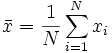
Empirical standard deviation:

Even though it is not a bad exercise to implement these formulas once in Matlab, you can also simply use the mean and std commands instead.
Attention: The calculation of empirical mean and empirical standard deviation only makes sense for NORMALLY DISTRIBUTED values!
Another important distribution that is also considered in this course is the uniform distribution, in which all values in a certain range occur with equal probability. (It makes absolutely no sense to calculate the mean and standard deviation for uniformly distributed values).
Sample size:
Care must be taken when calculating and interpreting the empirical mean and empirical standard deviation:
Only a limited sample is known, which does not necessarily represent the entire population. The larger this sample is, the more certain you can be that you are getting close to the actual values of the entire population.
The standard error of the mean (SEM) is used to estimate how well the sample sizes used characterise a population. This measure indicates the dispersion of the mean values of different random samples of the same size drawn from the population around the expected value (the true population mean). The standard error of the mean is defined as

Where
- n is the sample size (not the number of samples!) and
- σ is the standard deviation of the distribution (this is not normally known and must be estimated empirically from the data).
Graphical representation:
For both the standard deviation and the standard error of the mean, it is common to use curves with error bars for graphical representation.
- In Matlab, the command to draw a curve with error bars is errorbar(x,mw,error).
- Here
- x is the vector of x-values against which the mean value and error are to be plotted
- mw is the vector of mean values,
- error the vector of standard deviations or the standard error of the mean values
- The errors are plotted as symmetrical bars on both sides of the mean. (If you need asymmetrical error bars, please refer to the help).
- Since error bars are used to represent different quantities (especially standard deviation and standard error, sometimes also quartiles...), it is essential to write in the figure caption what the error bars mean - and to pay attention to this information when reading scientific publications.
Random numbers:
Before we deal with the statistical analysis of real measurement data, we first generate "measurement data" ourselves with Matlab, namely random numbers. These are used, for example, when planning experiments in which certain stimuli are to be presented in random order. Another important application of random numbers is the simulation of biological processes. When random numbers are generated artificially, the probability distribution (i.e. the probability of a random variable assuming a certain value) is known (in contrast to analysing measurement data).
In the course, we generate the following random numbers:
| M1=randn(Z,S) | generates a ZxS matrix with normally distributed random numbers with mean 0 and standard deviation 1 |
| M2=randn(Z,S) | generates a ZxS matrix with equally distributed random numbers between 0 and 1 |
| v=randperm(n) | returns a vector of integers from 1 to n in random order. |
Tasks:
T6A1) Try out the randn and rand functions:
- Generate some examples of normally distributed and uniformly distributed random numbers: What happens if you call the same functions several times in a row in the same way?
- What is the range of values for the two functions?
T6A2) Generate a very long vector (e.g. 10000 elements) with each of the two functions rand and randn.
- Look at the respective distribution of the random numbers with the command hist command.
- What are the differences between the two distributions?
- With hist(v,n) divides hist divides the vector v into n equally sized ranges. Look at the distributions for different values of n .
- Estimate from the figure: What is the mean? What is the standard deviation?
- Calculate the mean values, standard deviations, variances, minima and maxima of your two vectors with mean, std, var, min and max.
T6A3) Modify your random vectors by multiplying them
- multiplying them by different factors
- adding different numbers
- What effect do these changes have on the distributions?
- How do they affect the mean, standard deviation, minimum and maximum?
T6A4) Load the vector with the numbers of sunflower seeds from 100 flowers [sbkerne.mat]. Calculate the mean, variance and standard deviation. How did I create this vector? (No, I did not sit down in the garden and count...)
*T6A5) Convert the above formula for the probability density of a normal distribution into Matlab.
- Write a function that takes three input arguments
- a vector that specifies the definition range, e.g. x=-4:0.01:4,
- the desired mean value and
- the desired standard deviation
- As an output argument, the function should return the calculated probability density distribution as a vector
- The function should also display the probability density graphically as a curve (please include a title and labelled axes).
- Vary the parameters mean value and standard deviation. How do these change the curve?
T6A6) Write a function wuerfel that returns an integer between 1 and 6.
T6A7) Use this function in another function wuerfel_verteilung, which receives as input value how often the dice are rolled and returns as output the distribution (as a histogram stored in a vector) of the dice results obtained.
T6A8) You have the task of characterising the eating behaviour of mice, whereby the mice are fed exclusively with standardised food pellets, the number eaten of which is recorded every day. Write a function that simulates this data collection for a mouse:
- The function is passed the number of days to be simulated as the input argument.
- The function generates a random number for each day, which should represent the number of pellets eaten by the mouse.
- The mean value of the pellets eaten per day should be 30 and the standard deviation 5.
- The function returns the vector of pellets eaten.
T6A9) Use the function from T6A8 in another function:
- The function receives the number of days considered (sample size) as an input argument.
- The outputs are the calculated values for the mean, standard deviation and standard error of the mean.
- This function should also display the distribution of the values graphically as a histogram.
- Run this function for different sample sizes (i.e. numbers of days), e.g. N=1; N=3; N=5; N=10; N=20; N=50; N=100; N=1000. (You could write a script that calls the function with the respective sample sizes).
- How does the sample size affect the mean, standard deviation, standard error of the mean and histogram?
*T6A10) Program a function that controls an entire series of measurements of mouse eating behaviour for you.
- The function receives as input arguments
- the number of mice to be observed per day (number of samples) and
- the number of days on which the eaten pellets are to be counted (sample size).
- The return value is the standard error of the mean value.
- It also graphically displays the distribution of the mean values obtained as a histogram graphically.
- Try this function for different combinations of sample size and number of samples, e.g. 3 days with 3 animals, 10 days with 3 animals, 3 days with 10 animals, 10 days with 10 animals, 10 days with 100 animals, 100 days with 10 animals, 100 days with 100 animals, 1000 days with 10 animals, 10 days with 1000 animals.
- What effect do the two parameters have on the standard error of the mean?
- What effect do they have on the distribution of the mean values?
T6A11) The previous task was unrealistic in that all animals were statistically equally hungry. However, there are of course individual differences in real animals. The following matrix shows the measurements of 30 animals over 100 days, with each animal's values in the same row: [Maeusepellets.mat]
- Write a script that calculates the mean values and standard deviations between the days on the one hand and between the animals on the other.
- Plot the two courses of mean value and standard deviation in two figures with error bars. (Don't forget the labels so that you can find your way around later when comparing the figures).
- How do the results differ for the two ways of calculating means and standard deviations (between days vs. between animals)?
- Calculate the resulting standard error of the mean for both ways and also show this in separate figures with error bars.
- How do the figures differ? What conclusions can be drawn from each?
B) MEDIAN AND QUANTILE
It is true that there are many data sets that can be well explained by normal distributions. However, some data sets do not fulfil this condition and "skewed" distributions are measured. This occurs in particular when there are outliers in the data set (i.e. particularly large or particularly small values, see below). These distort the mean value. In these cases, it is therefore often more advisable to calculate the median instead of the mean in order to analyse the "typical" measured value. The median indicates the value at which half of the measured values are smaller and the other half larger, regardless of how large or small the values are.
This sorting of the data according to size and subsequent subdivision into classes with the same number of data points is known as quantiles. In addition to the median (division into 50% pieces), the quartiles (division into 25% pieces) and percentiles (division into 1% pieces) also play a role. For example, the 3% and 97% percentiles are commonly used in analyses to decide whether a measured value is "normal" or "conspicuous".
A common graphical representation of data analysis based on medians and quantiles is the box plot. This contains the following information:
- for each given x-value, the range from the 25% to the 75% percentile of the y-values is shown as a box
- Within this box, the median is marked with another line.
- Bars at the top and bottom (referred to as "whiskers") indicate the range in which the remaining data points that are not to be regarded as outliers lie.
- In the boxplot, outliers are plotted as individual data points above or below the whiskers. Data is considered an outlier if it is greater than q₇₅+1.5*(q₇₅-q₂₅) or less than q₂₅-1.5*(q₇₅-q₂₅), where q₂₅ is the 25% percentile and q₇₅ is the 75% percentile. For normally distributed data, this corresponds to a value of about +/-2.7*standard deviation, which corresponds to about 99.3% of all data.
Matlab:
| mx=median(x) | calculates the median of the vector x. |
| mM=median(M) | calculates for each column of the matrix M the median. |
| mM2=median(M,2) | calculates the median for each row of the matrix M the median. |
| Z=prctile(x,p) | calculates for the data vector x (or for each column of the matrix x) the p-th percentile. However, this function is not included in the standard scope of Matlab, but in the Statistics Toolbox. (However, you can easily write it yourself, see below) |
| boxplot(X) | generates a boxplot. If X is a matrix, the median, percentiles and outliers are calculated for each column and plotted as a separate "box". |
Tasks:
T6B1) Skewed distributions are often seen when measuring reaction times. Look at the distribution of the reaction times (in ms) of this test subject: [rt_VP5.mat] (Hint: if you take a histogram with many classes, you will see more!) Why is this not a normal distribution?
T6B2) Calculate the mean and median of the reaction times for the same data set. Why do they differ so much?
T6B3) Create a boxplot for the data. This will show you that there is a single extremely large value. Delete it from the data set and compare the mean and median again.
T6B4) Repeat the observation of distribution, boxplot, mean and median for the entire data set [rt_all.mat], in which 180 reaction times were measured from 24 test subjects. First consider the entire data set together, without looking at individual differences between the test subjects.
T6B5) Make a statistic about how much the mean values and medians differ for the test subjects. Should you average here?
T6B6) How much do mean values and medians differ in the example of sunflower seeds [sbkerne.mat]?
T6B7) Write a function percentile that receives a data vector and a number N as input parameters and returns the value of the N% percentile of the data vector.
C) SIGNIFICANCE TEST
Significance is very often required when analysing biological data. Unfortunately, we do not have time in the course to go into significance tests and their mathematical background in detail. However, we will try out the use of significance tests in Matlab with two simple examples. Significance tests are not included in the standard Matlab programme, but can be found in the "statistics" toolbox (which should hopefully be installed on all computers in the room).
Attention: The use of significance tests only makes sense if the sample is large enough! (Wikipedia gives n>30 as a rule of thumb if the data does not necessarily come from a normal distribution - but it also depends on the standard deviation of the distribution how large the sample must be to provide meaningful results).
The first example is the t-test for the expected value of a normally distributed sample.
- In this test, the null hypothesis is that a set of n measured values (independent, normally distributed random variables) originates from a distribution with a given mean value μ₀ and unknown variance, i.e. that μ₀ = μ.
- For this purpose, the empirical sample mean
 and the empirical sample standard deviation s (see above, labelled sx) to calculate the test statistic t:

- As can be seen, the sample size n is included here (as with the standard error of the mean) in addition to the empirical standard deviation s and the distance between the measured mean and the mean to be tested. The larger the sample, the greater the distance between the mean values and the smaller the standard deviation, the greater the amount of the test statistic t.
- The null hypothesis μ₀ = μ is rejected at the significance level α if

- the amount of t is greater than the (1-α/2) quantile of the t distribution with n-1 degrees of freedom (these values are normally stored in tables and are of course known to Matlab).
- If the null hypothesis is rejected at a significance level of 5%, for example, this means that there is a 95% probability that the measured values do not originate from a normal distribution with the mean value μ₀ , i.e. the values are really different.
- In 5% of cases, however, the significant difference may have arisen by chance within the distribution of the null hypothesis.
- If the null hypothesis is not rejected, it is not permissible to conclude that the measured values originate from the distribution to be tested!
The second example is a t-test for two independent samples. In this case, the null hypothesis is that two samples x and y originate from two normal distributions with the same mean, i.e. H₀: μx = μy. For this purpose, the empirical sample variances and sample means are used to determine the so-called weighted variance

is determined in order to calculate the test variable
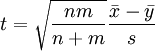
to calculate the test variable. Using the inequality

is used to check whether the null hypothesis on the significance level α can be rejected and thus whether a significant difference between the two samples can be assumed.
Matlab:
h=ttest(vector,mean) | tests whether the null hypothesis can be rejected, i.e. that the values in the vector vector vector follow a normal distribution with the mean value mean value originate from a normal distribution. The standard significance level is 5%. |
h=ttest(vector,mean, alpha) | as above, but with specification of the significance level alpha |
h=ttest2(vector1,vector2) | tests whether for two samples vector1 and vector2 the null hypothesis that both samples originate from the same distribution can be rejected at the standard significance level of 5%. |
h=ttest2(vector1,vector2, alpha) | as above, but with specification of the significance level alpha |
The following applies to all ttest functions: The return value is
- 1 if the null hypothesis is rejected (i.e. if the expected and empirical mean values are different with 100-α% probability).
- 0 if the null hypothesis cannot be rejected.
The box plot is again a good aid for assessing significance. This can be called up in Matlab with the 'notch' option, so that a notch in the box represents the 5% confidence interval (assuming that the data is normally distributed). If the notches of two boxes overlap, the data are probably not significantly different at a 5% level.
- boxplot(matrix,'notch','on')
Tasks:
T6C1) A super-smart food manufacturer claims that a mouse eats an average of 31 food pellets per day.
- Check this statement for a significance level of 5% for your entire mouse population using the measured data [Mauesepellets.mat]
- What does it look like at a significance level of 10%?
- *) For how many mice can the statement of the feed manufacturer not be rejected?
- Look at the data in the boxplot. Are your test results confirmed there?
T6C2) Analyse the same data set:
- Did the first two mice eat significantly different amounts?
- Did the entire group of mice eat significantly different amounts of pellets on the first and fifth day?
- *) In how many pairs of mice is there a significant difference in the average amount of pellets eaten?
- *) In how many pairs of days is there a significant difference in the average number of pellets eaten by all mice?
- *) Are there pairs of mice or days with a highly significant (alpha=0.01) difference in the amount of food eaten?
MAIN TASKS:
Command reference: Matlab syntax
T6H1) Three different types of random numbers are used in the programme [vogelfang.m]. Copy this programme.
Make the following changes step by step:
a) In blackbirds, there are 60% females.
b) In sparrows, the weight of females is 3 times higher than the weight of males.
c) There are 25% tits and 25% sparrows in the area.
T6H2) Using your solution of T4H7 based on [vogelfang.m] (or alternatively the sample solution[vogeltabelle_insa.m]), generate 10 bird catch matrices and calculate the means and standard deviations of the weight for each combination of species and sex, as well as the standard error of your weight measurements.
- Is the weight of the species significantly different?
- Is the weight of the sexes of one of the species significantly different?
T6H3) In a psychophysical experiment, three different tones are to be played to a test animal in random order, but each tone is to occur exactly 5 times. We do not worry about generating the tones for the time being, but simply call them condition 1, 2 and 3.
Think of an algorithm that puts the stimulus conditions in the right order and implement it in a programme.
Test the programme by running it several times. Does it always do what it is supposed to? Are the results the same every time?
Extend your programme so that it puts N (any number) stimuli, which are to be played M times (i.e. any number of times), into a sequence.
Tip: Use the repmat function for this task. This generates a large matrix by repeating a smaller one several times. For example, B = repmat(A,2,5) creates a matrix B that contains a total of 10 copies of the matrix A, whereby A is arranged twice below each other and five times next to each other.(B therefore has twice the number of rows and five times the number of columns of A.)
*T6H4) The measured values of an apparatus are not perfectly free of noise even without a biological preparation. In order to estimate the device noise, 100 measurements with the same stimulus [stimulus1khz.mat] were carried out in the electrophysiology practical course for the apparatus with a model cell (an electronic circuit that simulates the membrane properties of a nerve cell) and the responses were saved as a matrix under[responses1khz.mat].
- Look at any single measurement together with the stimulus (according to task T5C3).
- Calculate and plot the time course of the response averaged over the 100 measurements in a new graph window.
- Calculate and plot the mean value and the standard deviation of the last 300ms for each measurement (averaging over time) in a new graph window. Is there a tendency? Are there any outliers?
- Calculate and output as text output in the command window: Are the mean value and / or standard deviation different before, during and after the stimulation?
*T6H5) (For those interested in maths) Measurement data often looks quite complicated at first. On closer examination, it sometimes turns out that they originate from two overlapping distributions. For example, the distributions of the heights of men and women overlap (because there are women who are taller than many men).
Imagine you are given the task of inferring gender from height and you know the distributions of heights. The "maximum likelihood" principle is often used for such tasks: Tap the distribution with the higher probability for the given value. This idea can be used to determine a threshold value below which you should tap the distribution with the smaller mean value. This threshold value is the intersection of the distributions.
- Generate two random numbers from different normal distributions, one with a mean of 5 and a standard deviation of 2, the other with a mean of 3 and a standard deviation of 1.
- Using the probability density formula introduced yesterday, calculate the probabilities for each of the two random numbers that they come from one or the other distribution.
- Extend this programme for two vectors of random numbers from the above distributions.
- Calculate the proportion of random numbers that would be assigned to the wrong distribution according to the maximum likelihood principle.
- Look at the two distributions graphically. Where should you draw the line?
- Vary the mean values and standard deviations of the two distributions. When are there more and when fewer errors?
**T6H6) (For those interested in maths) Expand the last task to a function which, given two mean values and two standard deviations, outputs the value at which the boundary should be drawn in order to separate the distributions optimally.