
Service-orientation guideline
Service-orientation guideline
Service-orientation guideline
Service orientation and cooperation
You can also find the full guidelines on the administration’s portal.
The role of the central administration is to provide administrative support for research, teaching, student affairs and continuing professional development programmes, as this is the only way to ensure that the university runs smoothly, continues to develop and remains competitive. This requires reciprocity – that is, collaboration between central and decentralised administration, the academic community, students and external individuals and partners.
For administrative work to be successful and effective, it is essential to keep processes as streamlined as possible for all those involved, whilst also continuously developing them (technically). This creates sufficient time for services and consultations that require more individualised solutions. A service-oriented approach should therefore be an integral part of the administrative culture at the University of Oldenburg and encompasses, in particular, the values accessibility, a focus on solutions, reliability, speed and friendliness as well as transparency and naturally apply to all forms of work (on-site, mobile working and remote working). Within the framework of legal compliance, which is ensured in day-to-day administrative work, these six values form the basis for good service, which must be utilised to the fullest extent possible. This also means that refusals are communicated transparently and justified in a way that is easy to understand.
Accessibility
Set up telephone forwarding for mobile work / teleworking
In order to be reachable, the work telephone must be forwarded for the working days. This works via https://xpression.uni-oldenburg.de and the time profiles specified there or by entering the telephone number used in mobile work / teleworking (see: Setting up telephone forwarding to the home office)
Provide a callback and feedback guarantee
This means that the person seeking advice always receives an answer, even if the matter has already been resolved or changed.
Provide out-of-office notes / answering machine
Anyone who cannot be reached at work - whether working remotely or in the office - should set up an out-of-office note in Outlook and switch on the answering machine. Ideally, it should state when the person will be back and who will take over in urgent cases (see: Setting up an out-of-office note for emails and recording text for answering machine).
Communicate presence and absence
It can be beneficial for availability to schedule regular or reliable office days. It also ensures transparency if direct colleagues are reliably informed in the event of illness or absence and can ensure availability as a deputy or at least pass on the correct information to those seeking advice.
Specify email signature
The use of a standardised email signature[1] can help with making contact. If you have fixed days for mobile work / teleworking or absences, you can also include these in the signature (see: Setting up a standardised email signature).
Use functional email addresses
By using functional accounts, it is easier to ensure that enquiries are processed, as several people have access to the mailbox and absences can be better compensated for.
Place up-to-date information on the homepage
People can be reached better and faster if all contact details on the homepage are up-to-date and correct. To do this, your own details must be regularly updated on Stud.IP and be correct in the telephone directory. This is the only way to successfully use Find&Phone (the internet-supported telephone number search and dialling option).
Standardised processing of problems
Some organisational units, such as building management and IT services, work with a telephone hotline with on-call service and a fault portal. In addition, some areas in central administration use the "Topdesk" portal, where the person seeking advice writes to a functional email address and receives a standardised re-registering student with a ticket number. In this way, the status of processing can be called up and the enquiry is not personalised.
[1] (cf. Manual on the Corporate Design of the University of Oldenburg - Administration Portal, p. 52)
Solution orientation
Standardise processes
It is important to analyse the causes of enquiries and problems and not just deal with the symptoms. The latter may lead to success more quickly in individual cases, but is not expedient in the long term. In addition, quality assurance can be guaranteed by standardising processes so that, for example, enquiries submitted via a ticket system are always processed with a similar level of quality and speed. A "single point of contact" also offers the advantage that the enquiry is received in one place, rather than several people being contacted and nobody really feeling responsible. This is because disrupting the workflow, i.e. picking up the phone ("Hey Joe principle") because you know someone who might know the answer, does not help in finding a general solution.
Use interfaces
In order to advance solutions, it is important that the organisational units do not work independently, but use interfaces and work across departments for certain issues. The aim should be good and constructive cooperation in which regular dialogue and the expansion and maintenance of networks take place.
Expand expertise
Expertise and experience are needed in order to be able to offer solutions. This knowledge can be expanded or strengthened through further education and new insights can be shared in team meetings and exchange rounds. However, it is also important to know your own professional limits and to communicate these. This is the only way that people seeking advice can direct enquiries to knowledgeable people or organisations.
Accepting enquiries and passing them on
It can also be solution-orientated if, in the first instance, you also deal with enquiries for which you are not responsible. This means that the person seeking advice still receives re-registering student and is informed of any non-responsibility and, if possible, the correct contact person. This helpfulness also helps to find solutions. In addition, accepting constructive criticism can also lead to processes being improved or streamlined, enabling more solution-orientated action to be taken.
Reliability
Fulfilling tasks
For the organisational units in central administration, reliability means that tasks are processed constantly, promptly, consistently, on time and in a binding manner. In addition, interim statuses are communicated openly and urgencies are communicated and/or requested as precisely as possible so that re-registering students can be provided in good time.
Optimising processes
Reliability also means that processes in day-to-day work run as agreed. Technological support can help here, as can the automation and optimisation of processes by streamlining and simplifying work steps. Reliable processes must be documented and priorities constantly redefined or reassessed so that quality remains constant or can even be improved.
Ensure availability
Reliability is also characterised by good and constant availability. Division 4, for example, works with a central fault reception desk that can be contacted in an emergency in the event of faults in building operations (extension in urgent cases: -2222) The IT services have a central point of contact, the IT service desk, which questions and orders for IT services as well as fault reports from all authorised users of university IT services at any time at .
Strengthening trust
Reliability also means that employees have confidence in the actions of their counterparts. This works by justifying decisions in a comprehensible manner and making them on the basis of a consistent and transparent catalogue of criteria, for example. In addition, it should always be communicated that concerns are taken seriously and dealt with.
Utilise exchange
Regular dialogue is important for reliability and can be ensured, for example, through weekly team meetings and in-house training for employees.
Speed
Clearly define responsibilities
In order to be able to process and resolve issues quickly, it is important that responsibilities are clarified and communicated. Without a clearly communicated allocation of responsibilities, both internally and externally, several people will be contacted with an enquiry and, in the worst case, no one will feel responsible because another person could respond. Clarity of responsibility can avoid duplication of work and delays, which could otherwise increase due to the heterogeneity of working time models, e.g. part-time, teleworking or mobile working. It is also important for the speed of processing that information on proposals and home mail envelopes is filled in correctly and completely.
Optimising processes and expanding digitalisation
Clearly defined workflows and the expansion of digital structures allow concerns to be processed more quickly, as the defined responsibilities coincide with defined processes / work steps. Workflows are streamlined and additional steps are eliminated, for example through digital signatures and e-invoices. Provided guidelines, checklists and the use of a wiki can also be helpful, but these considerations are more in the area of knowledge management.
Prioritise requests
In order to be able to act and react quickly, requests must be prioritised. For this to work, firstly the request must be made precisely and secondly the key data must be analysed and specifically requested. In addition, the receipt of the enquiry should be confirmed and the time corridor for responding should be indicated, as this minimises follow-up questions about the interim status. Speed does not always mean that a satisfactory result has been achieved. Some work processes take longer than others.
Use functional accounts
Work processes can sometimes be processed more quickly with direct communication and short paths, but in the long term the use of function addresses is more effective. A quick response can also express appreciation for the person seeking advice, but if the direct contact person is not present, the enquiry may come to nothing. If, on the other hand, enquiries are received centrally and distributed internally, there is always a contact person. In addition, the processing status can always be viewed under the case number.
Friendliness
Communicate respectfully
All communication should be polite, friendly and respectful. It doesn't matter whether you communicate in person, by phone or by email. This also includes approaching the other person openly, actively listening and letting them finish what they have to say. Concerns should be dealt with objectively and respectfully.
Living the service concept
Service orientation always includes the service concept. Workshops on service orientation and communication skills, for example, could be offered as part of the university's internal further education programme to familiarise new employees with this and give all employees the opportunity to refresh their skills. The university should aim to deal with concerns in a friendly manner, even in tense situations. It is also important to implement constructive criticism and to stand for trust and confidentiality. It can also be helpful for the person seeking advice if the contact persons can be found on the homepage with a photo, as this makes them appear more approachable. However, this should not be an obligation, as not every employee feels comfortable with this.
Keep an eye on your own behaviour and adapt it
Behaviour in interactions should always be professional, helpful and approachable. Even if a request is made several times, it should still be answered in a friendly manner. Criticism of a procedure or the quality of an enquiry should not be communicated via the large mailing list, but in direct communication. It is a good idea to think about any anger and to react thoughtfully after a pause rather than in the heat of the moment. In this way, conflicts remain focussed on the facts.
Transparency
Documenting processes
The administrative portal of the University of Oldenburg or the homepage of a unit can be used to document processes. Up-to-date organisational charts from the various organisational units clearly show which person is the right contact person for what. For large projects, the project profile can also be published, in which the most important key data is listed. Working with the cloud can also lead to increased transparency, as authorised users have access to the documents and are at the same stage of processing. This is because important decisions and changes within a work area or for a work area are communicated to those affected and interested parties.
Making the processing status visible
A transparent working method means that it is possible to enquire about the processing status and also to receive an explanation or an update on the status of work. This also includes sending a confirmation of receipt. By visualising work processes, errors can also be traced and corrected. Many of these points can be simplified by expanding digitalisation. In some cases, transparency can also be increased if the legal language is simplified or regularly updated within a team so that everyone has the same level of knowledge and a shared understanding of an issue. Exchange meetings could be organised at regular intervals for broader groups of people. This also means that several people could be included in the cc and a good handover ensured in the event of a substitution.
Set up a standardised email signature
There is an example of a good and clear signature in the University of Oldenburg's corporate design manual, which can be found on the administration portal.
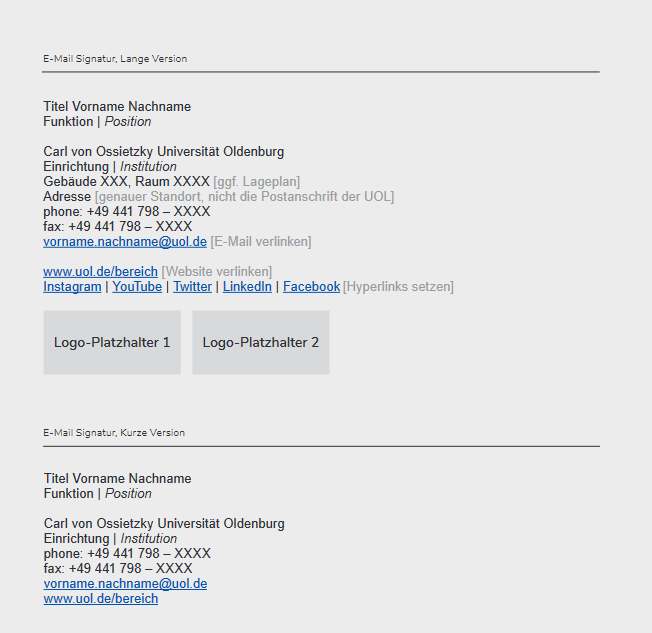
(cf. Manual on the Corporate Design of the University of Oldenburg - Administration Portal, p. 52)
Use an out of office note for emails
In order to inform those seeking advice about an absence as soon as an email is sent, it is important to set an absence note for planned absences. The most important questions to answer are When will the contact person be back, will emails be processed in their absence and can a deputy be contacted in urgent cases?
Here is an example:
Thank you for your message. I will be available again on XY.XY.XXXX. Your email will not be forwarded. Please contact me in urgent matters: Thank you for your message. I will be back in the office on XY.XY.XXXX. Your email will not be forwarded. In urgent matters please contact: Best regards / Kind regards |
|---|
Recording text for the answering machine
Using an answering machine can be helpful for those seeking advice, as it lets them know whether the contact person is only briefly away from their desk or not on duty for a longer period of time. Information on recording can be found in the administration portal(operating instructions for answering machine and fax functions)
Here is an example of an outgoing message that can be supplemented with additional information for longer absences:
| "Hello. You are connected to xx. Unfortunately, I cannot be reached personally at the moment. However, you are welcome to send me an email to: . Thank you very much." |
|---|
Set up forwarding of the telephone to the home office
Simple forwarding can be set directly via the telephone by selecting the "variable forwarding" option in the telephone menu and entering the destination telephone number. However, in this case the call forwarding remains in place until it is cancelled on the office phone, i.e. even after work if necessary. The more comprehensive option is to set up call forwarding via Xpression. Time windows in which call forwarding is possible can be specified there. An answering machine greeting is played outside these times.
Here is an example of an announcement for call forwarding:
"Good afternoon, you are connected to xx's line. I am currently not available in the office. Please press 4 [this is the number you have set up] to be connected to my home office. Or send me your request by email to . Thank you very much." |
|---|
Further recommendations for action for more or visible service orientation
The topic of service orientation and cooperation was worked on and differentiated in the individual organisational units - and in some cases also at team level. All results were summarised in this guideline and, where necessary, written down in more general terms. In order to show transparently how exactly service-oriented work is carried out in an organisational unit or team, a "Service orientation" button should be placed on the pages of the organisational units of the central administration, under which the specific information of the organisational unit or team is displayed.
The door signs could also be expanded to include information on special language skills, first aiders or fire safety assistants. Similar to the use of a photo on the homepage, however, this cannot be mandatory.
Common standards in the organisational units
It is important that reliable telephone forwarding is set up.
In the event of absences, there should be a meaningful out-of-office message by email and a suitable answering machine greeting.
This also includes using a standardised email signature.
Especially in times of mobile and hybrid forms of mobile working, it can make sense to define and communicate regular and reliable attendance times.
It also makes sense to standardise and regularly optimise processes. This also includes the regular documentation of work processes and results, as well as the introduction and use of digital proposals and signatures, which requires an expansion of digitalisation.
The last commonality goes in a slightly different direction. Respectful communication in day-to-day interactions was frequently mentioned.
In conclusion, it can be said that service orientation means living and experiencing the six values mentioned as comprehensively as possible, even if this does not guarantee a "desired result".