

Bitlocker (hard disc encryption)

Bitlocker (hard disc encryption)
Hard drive encryption for Windows
Bitlocker is a program to further protect unauthorised access to hard drive data. Normally this protection is completely unnoticed, but under certain conditions a key file or a key for Bitlocker is required. If this is not available, access to the data is no longer possible or at least considerably more difficult.
Please check whether Bitlocker is active and inform us if it is by following the steps below:
Step 1: Open the Windows settings (cogwheel in the start menu)
Step 2: Search for 'Bitlocker' there

Step 3: Go to 'Manage Bitlocker' and one of the two alternatives should appear:
Alternative 1: If it looks like this(Bitlocker enabled and the options to disable it), everything is ok: 
Alternative 2: If it looks like this (X: Bitlocker deactivated or Bitlocker waiting for activation), please inform us (→ it(at)icbm.de) to discuss how to proceed: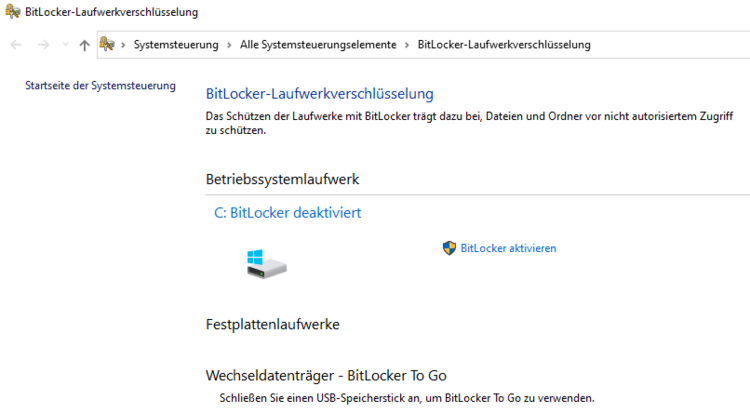 or
or