

Display options using CSS classes
Display options using CSS classes
In many places, the appearance of content elements can be influenced by certain extra features. This activates display variants.
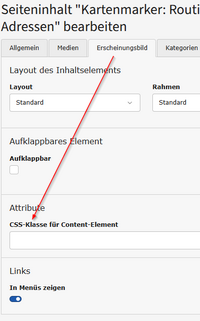
Not all of these features can be activated via certain checkboxes or similar, but some must be explicitly assigned via a text entry. A so-called CSS class is assigned to the content element, which then ensures the corresponding display variant.
To enter the CSS class, there is a separate free text input field CSS class for content element, which is located in the [Appearance] tab of the content element.
The name of such a "class" can now be entered in this text field, whereby the correct spelling is important! Here is an example:

In certain cases, it may also be useful to enter several such class names, e.g. when configuring a calendar overview view. In such cases, the individual class names are entered into the field separated by spaces:

Possible specifications for CSS classes
You cannot invent CSS classes yourself, but only those class names that are provided in the university's web layout have an effect. These CSS classes are mentioned in various places in this documentation, e.g. in the configuration of the appearance for calendars.