
FAQ
FAQ
Who organises the health days?
The Health Days are organised as a joint initiative by the Student Health Management and Workplace Health Management teams.
Can I take part in more than one offer?
There is no limit on the number of events each person may attend. Staff should please discuss their attendance with their line manager. However, we ask all those interested to consider which events they genuinely need or are interested in, and – particularly in the case of those with limited places – to allow others the chance to attend as well.
Will there be a certificate of attendance after the event?
No, a certificate of attendance will not be issued.
As an employee, can I take part in the activities on offer during the health days whilst I’m at work?
Most of these activities can be taken part in during working hours. Please discuss your participation with your line manager. Activities that take place outside working hours are marked accordingly under the ‘Registration’ section.
Can I take part in the activities offered during the Health Days whilst attending the course without it being recorded as an absence?
You can take part in these activities at the times indicated. Whether the lecturer grants permission to take time off to take part is at the lecturer’s discretion. Please ask the relevant lecturer.
Can I add the event directly to my calendar?
Yes, when you enrol on a course via Stud.IP, you will be asked straight away whether you would like the course to be added to your Outlook calendar.
Can I give feedback on the health days?
Yes, you can provide feedback directly on each programme, and for the majority of events you can also complete an evaluation form, which you will receive by email afterwards.
How do I sign up for special offers?
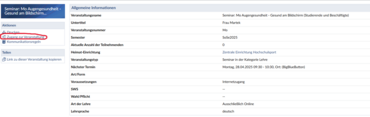
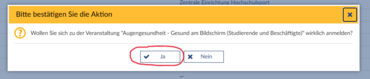
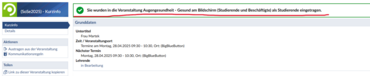
Click on the link under the ‘Registration’ heading in the course description; this will take you to the relevant platform where registrations are managed. Most registrations are handled via Stud.IP: as soon as you click on the link, you will be redirected to Stud.IP. There, you must click on ‘Access tothe course’ in the top left-hand corner, then confirm by clicking ‘Yes ’. A message should then appear stating : ‘You have been enrolled in the course “Name of the course” as …’. Your enrolment has been successful .
Is there a limit on the number of participants for certain activities?
Yes, places are limited for some events. Please check the relevant event details under the ‘Registration’ link . There you will find information on whether there is a limit on the number of participants.
Is there a waiting list for limited-availability offers?
Yes, Stud.IP has a waiting list. If a registered participant withdraws from a course, the next person on the waiting list automatically takes their place on the course and is notified.
Can I sign up at short notice or just pop in?
Registration is required or recommended for all events. In most cases, this can be done at short notice; however, please note that some events have limited capacity. You can also attend some events without registering; details of this will be included in the relevant description.
What happens if I’ve booked an appointment but am unable to attend after all?
If you are unable to attend an appointment at short notice, please cancel your booking so that the places can be made available to other people.
How do I find out if my registration was successful?
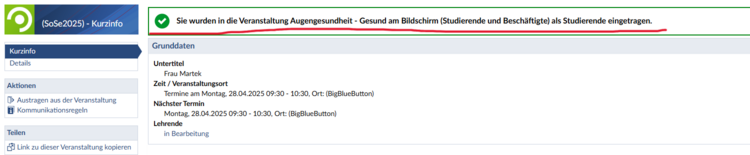
Once you have successfully registered for a course on Stud.IP, the following message will appear ‘You have been enrolled in the course “Name of the course” as …’. If you encounter any difficulties, please contact the Workplace Health Management service or the Student Health Management service.
Is there a recommended dress code for certain activities, or do I need to bring anything with me?
If there are any specific recommendations regarding clothing (such as sportswear), you will find these listed under ‘What to bring’ in the relevant event details . You will also find information here on whether you need to bring anything with you.
Is there food and drink available on site?
Unfortunately, we are not allowed to use our budget for catering. We therefore ask you to bring your own food and drink.
How long do the individual activities last on site?
Please check the individual events for their duration. You will find the duration listed under ‘Event information ’.
On which platform do the online activities take place?
Most online courses are delivered via BigBlueButton (BBB). The virtual rooms are provided by the university. In some cases, courses take place on other platforms. Details of this can be found in the course description.
Where can I find the BBB link for the online services?
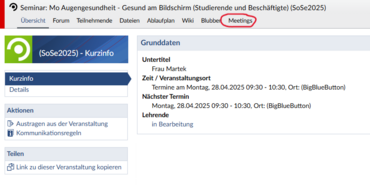
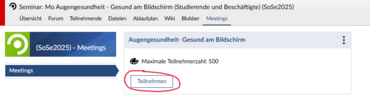
You can find the BigBlueButton meeting room on Stud.IP. To do this, please click on the event on Stud.IP, then click on the ‘Meetings’ tab at the top, and then click on‘Join’. As soon as the event begins, you will be redirected to the room. The room will open approximately 15 minutes before the event begins.
Is there a guide on how to use the platform?
Please see the IT services website for further information: https://uol.de/itdienste/services/video-und-webkonferenz